
MovieBox APK Movies, TV Shows & More
MovieBox is a free entertainment app for Android that allows you to stream, discover, and download movies, TV series, and anime all in one place.
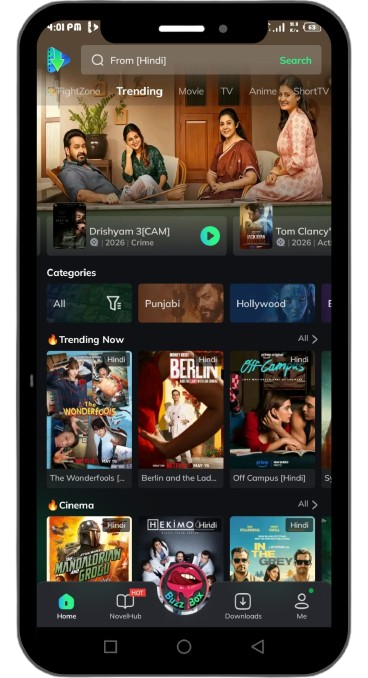
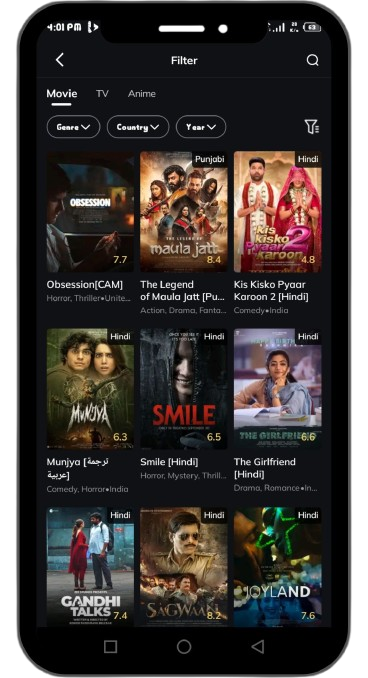
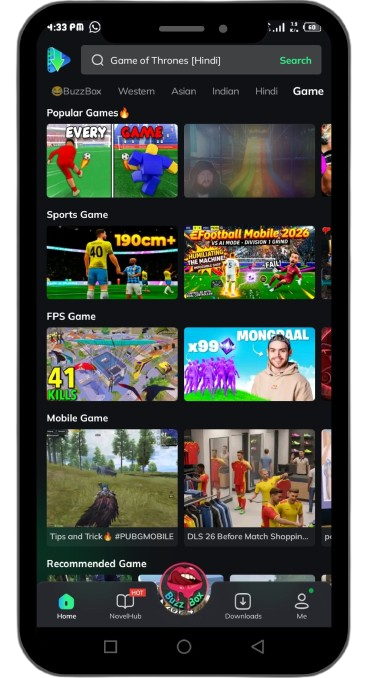
MovieBox
MovieBox is a free entertainment app for Android that allows you to stream, discover, and download movies, TV series, and anime all in one place without any subscription fees. You can explore a vast library of content, including Nollywood films, Hollywood hits, K-dramas, and seasonal anime, all from your phone.
The app serves as a third-party streaming and discovery platform. Unlike Netflix or Prime Video, Movie Box does not store content on its own servers. Instead, it gathers streams from various sources on the web and displays them in a user-friendly, searchable format.
The app tracks playback history, making it easy to find content later. Users can watch full content without needing paid accounts. The collection expands daily with new movies and TV episodes. It keeps users informed about trending media worldwide. Overall, it offers free streaming without complicated steps.
What is MovieBox APK?
MovieBox APK is a free streaming app that lets users watch and download the latest movies, TV shows, and web series on their Android devices. Unlike traditional streaming services, it doesn’t need any subscription or sign-up, making it easy for anyone to enjoy unlimited entertainment. With a large collection of HD content and a simple interface, the APK has become a popular option for movie lovers seeking quick access to high-quality videos anytime, anywhere.
The interface allows users to sort by rating and release date. It also provides personalized sections based on viewing history. The collection includes action, thrillers, anime, and regional hits. It delivers new global films with instant access in HD. Users can enjoy premium quality content without hidden fees. It offers an enhanced viewing experience on Android devices.
Features of MovieBox App
The MovieBox APK app includes key features that set it apart from other streaming apps. Each feature is unique and impressive. Let’s explore them one by one.
4K Ultra HD Movies & TV Shows
This is an online cinema app that offers a mix of new and classic movies in 4K quality. Users can choose their preferred video quality. All shows and web series are available in high video quality, which attracts more users seeking an excellent movie streaming experience. This feature eliminates the need to go to commercial cinemas. Simply open the app, pick a movie, and select your desired video quality to start streaming right away.
No Ads & Pop-Ups
The MovieBox Online eliminates ads and banner pop-ups during streaming. Users rarely encounter ads while watching movies or using the app. This focus on an ad-free experience enhances the overall streaming quality for users. Cinema enthusiasts appreciate this feature, as it truly meets their expectations.
No Buffering Issues
The APK guarantees smooth content streaming, even in Ultra HD resolution. It performs well under all conditions. Users seldom experience loading delays or slow playback while enjoying movies, shows, or web series. Live sports events also stream seamlessly. This app utilizes multiple servers to ensure stable performance. Even with a large user base, buffering issues remain minimal. Download this streaming APK and enjoy endless entertainment.
Completely Free Streaming
This online movie app offers completely free access without any hidden subscription fees. Unlike other streaming services that later require monthly payments, it provides content at no cost, which many OTT platforms typically charge for. The primary goal of this free OTT streaming platform is to ensure easy access to entertainment for users. It believes that digital entertainment should be free for everyone.
Watch Anytime, Online or Offline
Users of the MovieBox Download can enjoy it both online and offline. PC users can access a web-based version for free streaming. They can stream movies and shows on PCs and Android devices. Additionally, users can download movies to watch offline later. This app offers both online and offline streaming options, allowing users to enjoy their downloaded content without an internet connection.
Built-in Media Player
This e streaming app features a built-in media player that supports external players. This media player ensures smooth playback and a seamless streaming experience. It works perfectly with the app, providing users with an excellent viewing experience. Users can easily pause, resume, adjust the volume, and skip ahead, making MovieBox App Download one of the top movie streaming platforms.
All-in-One OTT Content Library
This mobile streaming platform provides users with free access to popular OTT content from platforms like Netflix, Amazon Prime Video, HBO, Disney+, Disney+ Hotstar, and Paramount+. The streaming app boasts a vast library of movies, TV shows, and series. It offers films across every genre, including horror, action, suspense, thriller, comedy, drama, science fiction, and kid-friendly content like cartoons and educational videos. This app serves as a cost-effective alternative to expensive OTT platforms filled with ads and subscription fees.
Works Across Multiple Devices
The developers of the app designed it to perform well on all devices. Whether you use an iPhone, iPad, PC, Windows laptop, Android device, smart TV, or Firestick, it delivers reliable performance. It is compatible with nearly all types of devices, and on some, like Roku, it connects through screen mirroring or Chromecast. This feature highlights its excellent compatibility and convenience.
Safe and Secure to Use
The latest version of the MovieBox Older APK is safe and secure because it doesn’t collect personal data from users. Our app file is free from viruses, spam, and malware. We guarantee a safe file and secure usage when you download the app from our official website. We cannot ensure safety if you download the app from other sources. We suggest you download and install this streaming APK only from our official site.
Lightweight App
It is a compact application. Its small size, only 62 MB, means it doesn’t use much storage on your phone. Users can easily download and install it without using many resources. This helps save phone storage and provides quicker access to movies. It’s perfect for everyone, especially those with budget devices. Users enjoy smooth streaming on nearly all devices, even those with low RAM.
Screen Mirroring and Chromecast
The MovieBox Mod APK can transform your large TV screen into a cinema using screen mirroring or Chromecast. These features enhance your streaming experience without the need for cables. They allow your entire family to enjoy movies and shows in HD resolution, making the viewing experience comfortable for everyone. Features like these truly make fans of this streaming app appreciate its value.
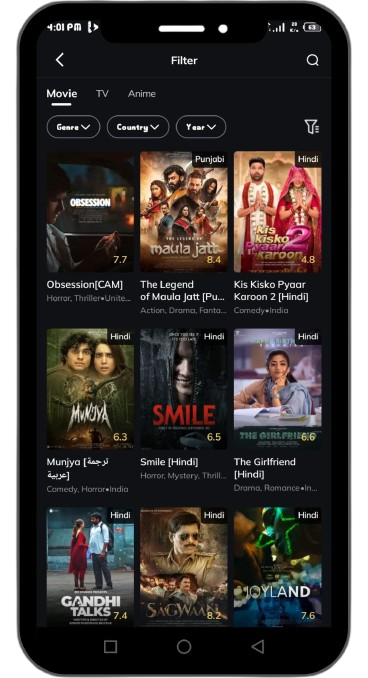
MovieBox App Screenshots
Explore the MovieBox app interface and streaming experience.
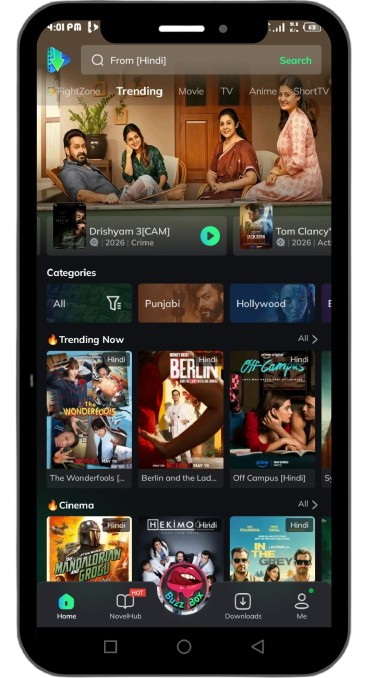
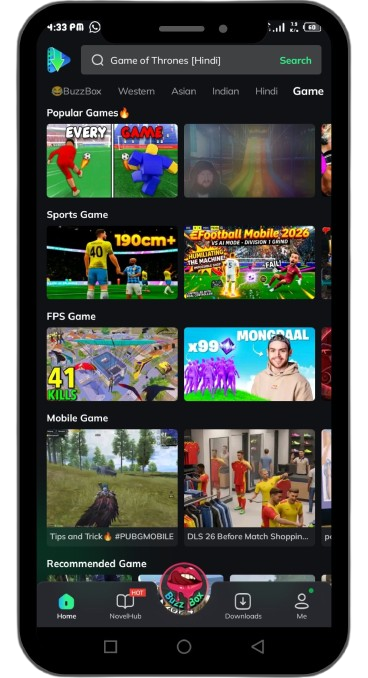
System Requirements
To download the APK on your Android device, ensure your phone meets these basic requirements for a smooth installation:
- You need Android 5.0 (Lollipop) or higher.
- Your device should have at least 1 GB of free storage space.
- Aim for a minimum of 2 GB RAM, with 4 GB or more recommended for optimal performance.
- Ensure a stable internet connection of at least 6 Mbps for smooth streaming.
How to Download MovieBox APK for Android?
Installing the MovieBox Mod APK on your Android device is quick and easy. Follow these steps to get the MovieBox app on your phone in just a few minutes:
- First, enable “Install from Unknown Sources” in your phone settings to allow APK installations.
- Next, visit our website and click the download button for the Android APK.
- After the download finishes, tap the downloaded APK file to install it.
- Once the installation completes, you will find the app icon on your home screen.
- Click the icon and start streaming your favorite movies, TV shows, web series, and sports events without ads and with premium features unlocked.
How to Install MovieBox iOS Download?
iPad and iPhone users can easily download and install the app using two methods. The first method is through the Safari browser, which is straightforward. The second method involves sideloading the IPA file onto the device. Both methods are simple.
Using Safari Browser
- Open the Safari browser on your iPhone or iPad.
- Search for our website or type our website address in the search bar.
- Click the download button once you reach our website.
- After the download, install the app on your iPhone.
- Enjoy unlimited HD movies, both old and new, along with top TV shows, web series, and sports events.
How to Download MovieBox Pro APK for Firestick?
Users can download the APK to watch unlimited movies and shows on their big screens, transforming their Fire TV into a smart TV.
- Turn on your Fire TV.
- Navigate to Settings, then Developer Options, and enable apps from unknown sources.
- Return to the home screen.
- Search for and install the “Downloader” app.
- Open the Downloader app.
- Enter “MovieBox APK” and download it.
- Install the app on your Fire TV.
- Open the app and begin watching movies.
MovieBox for Windows (PC & Laptop Version)
Downloading MovieBox for your PC or laptop is easy. You can now install the APK directly on your PC without needing an emulator. Follow this simple guide:
- Visit our website and click the download button for PC.
- Once the download is complete, click the install button.
- After installation, you can start enjoying online streaming of movies and your favorite shows in Ultra HD resolution.
How to Download Movies Using the MovieBox App?
Users can easily download movies from the MovieBox Application in HD for free. Here’s how:
- Open the app to see sections like Trending, Live, Movies, and Anime, along with the Novel Hub and Download section at the bottom.
- Choose your category and tap on the movie you wish to download.
- After tapping, the movie will be available for online viewing.
- Look for the floating download button at the bottom and click it.
- Once you click the download button, select your preferred audio and video quality.
- The download will begin in the background after you make your selections.
- Check the download status and enjoy the movie once it’s finished.
How to Download and Install the Old Version of MovieBox Pro App?
Not every device runs the latest version smoothly, and that’s perfectly okay. If MovieBox v4.0 doesn’t work on your device, an older version will work just as well. Here’s how to get it:
- Uninstall the current version of the app from your device.
- Open any browser and go to our website on your phone or tablet.
- Scroll down and click the “Old Versions” button to see all previous releases.
- A new page will open, showing all available older versions of MovieBox.
- Find the version that matches your Android OS and click “Download” to get it.
- Install it by following the same steps in the installation guide above.
How to Use Movie Box?
To use the MovieBox Watch Online, follow these steps:
- Open the app on your Android device.
- Browse the home screen for content and features.
- Use the search option to find the media you want.
- Select any content to view its information and options.
- Choose your preferred video quality based on your internet speed.
- If available, pick subtitles or languages in the media player settings.
- Control video playback using the options in the media player.
- Add your favorite content to the favorites section for easy access.
- Explore various categories and genres to discover new media.
- Update the APK to the latest version whenever a new one is released.
Alternatives to MovieBox Mod
Netflix
Netflix is a well-known subscription service offering a wide range of media, from action films to horror movies. It features a vast collection of licensed content, including options for dubbed versions. The platform also showcases its own original movies and series.
Crunchyroll
Crunchyroll is an anime-focused app with a vast collection of anime movies and series. Anime fans and enthusiasts primarily use this platform.
Tubi
Tubi is a free streaming service that offers a variety of movies and TV shows without any payment. Users can enjoy streaming while watching ads instead.
Pluto TV
Pluto TV is another streaming app that provides a wide range of media content. It allows users to watch high-quality content for free, though they must watch ads.
Amazon Prime Video
Amazon Prime Video offers a broad selection of movies and series in different resolutions. Users can enjoy TV shows, films, and various other categories. This subscription-based app allows access to premium content with a paid membership.
Disney+
Disney+ primarily features entertainment from Disney, along with content from brands like Pixar, Marvel, Star Wars, and National Geographic. The available content varies depending on your location.
Pros and Cons Moviebox Web
Pros
- The application features a vast collection of movies and TV shows.
- It provides a simple, user-friendly interface.
- Each piece of content includes multiple video quality options.
- Subtitles are available for supported media.
- Finding and searching for content is easy and reliable.
- All media content is organized by genres and categories.
- Additionally, the app regularly updates its content and adds new media.
- This app works well with most Android devices.
Cons
- The application needs a fast and stable internet connection for an improved experience.
- Some content may differ based on your location.
- The features and options rely on the app version.
- You can update to the latest version manually.
Conclusion
MovieBox Latest creates a vibrant space for film enthusiasts. It allows users to stream, download, and discover endless content. The app connects OTT services with free access. Its advanced features ensure flexible entertainment for all users. The design emphasizes simplicity and quick searching. It includes smart filters and daily global movie recommendations. The library features both Hollywood and regional hits. Users can enjoy offline viewing with download and storage tools. It supports subtitles and offers language options across titles. The app also syncs user data using the cloud. Its servers provide stable streaming without delays or crashes.
Explore MovieBox
Discover movies, TV shows, anime and entertainment content with the MovieBox-style interface.
⬇ Download MovieBoxFrequently Asked Questions
Here are some common questions about MovieBox.
Yes! There are no subscriptions or hidden fees; you can enjoy pure Moviebox Pro free streaming.
Moviebox Android links only to publicly available content and uses secure HTTPS connections for your safety.
No downloads are required. It works instantly in your browser, even better than traditional Moviebox APK downloads.
Streaming requires internet, but you can use the offline download feature to save content and watch it later without any data.
It is a special login area for private or beta users of the app.
No, you can stream and download without creating an account. The app allows direct access after you grant basic permissions, making it easy and quick for every viewer.
If available, open the video player and tap the subtitle option, then select and download the subtitles.